
The Offerandum guide
How to add an instant quote calculator to your website
An instant quote calculator turns customer selections into an estimate using your company's pricing rules. You can add one through a hosted link, an embedded calculator, a website plugin, a general form builder with calculations, or a custom application.
With Offerandum, we start with a conversation about your business and the materials you already have, then refine a working draft together. Building and 14 days of testing are free; you pay only if you decide to launch. See how setup works .
Using a website builder? Try the quote calculator for Squarespace or the Wix quote calculator , with live examples and installation checks. For a worked pricing brief, follow a service price list through to a Squarespace calculator .
Choose an instant quote calculator by the work you want to own
Use these five routes as a shortlist. They are not five levels of quality; each leaves a different amount of work with your business.
- Hosted calculator link: useful when you can change a button or send an email but are not ready to edit the website layout. Someone still needs to prepare the calculator.
- Embedded calculator: useful when you want the prepared experience on your service page and the site accepts HTML and JavaScript.
- Website plugin: worth evaluating when your team maintains the website and can configure the estimating rules in the selected tool.
- Calculation builder: worth testing when its available fields and conditions can describe your offer and someone will assemble the workflow.
- Custom application: consider it when you have documented requirements that the other routes do not meet and an owner for ongoing development.
Before comparing tools, write one standard configuration and one exception. For a sauna shop, that could be a room-sized package and a larger package with upgraded wood and different installation conditions. Ask each proposed solution to produce the scope, result, and request your staff actually needs. This separates a working estimator from a screen that merely shows a total.
Option one: send visitors to a hosted calculator
A hosted calculator has its own address. You can link to it from a service page, a button, or an email without placing the entire experience inside your website layout. For a contractor whose site is managed by someone else, this provides a way to share a prepared calculator while arranging any later changes to the main website.
The link still needs a clear introduction. Tell visitors which product they will configure, what information they should have ready, and what they will receive. A button labeled only “Learn more” does little to explain a multi-step estimate. Match the promise to the outcome, particularly when the calculation depends on measurements that the customer has not yet verified.
In Offerandum, the hosted experience can carry your branding and use the same prepared calculator, lead handling, and PDF output. Test it as a complete customer journey. Open the link from a phone, choose a realistic package, and review the submission. Decide how you will direct customers back to your company information or the next conversation. A working address is the beginning of distribution, not a substitute for preparing the estimate itself.
Option two: embed a prepared calculator on your page
Embedding puts the calculator alongside the service description and other information on your website. The page needs to allow HTML and JavaScript. With Offerandum, you copy the complete embed code from the panel and place it in an appropriate HTML area. The code includes both the loading script and the element identifying the calculator. Installation does not create the pricing logic.
This approach separates two responsibilities. Your website editor controls the surrounding content and placement. The calculator's rules and rates are maintained through the calculator workflow. That distinction is useful when a marketing update should not require rewriting an estimate, or when a rate changes without changing the description of the service. Make sure both responsibilities have an owner.
Follow the installation instructions , check the allowed website addresses in the panel, and test the published page. Give the calculator enough room to display its selections and summary. A narrow sidebar may be a poor fit for a detailed product configuration. Check the final contact step as well as the opening screen, and confirm that the resulting email and PDF describe the same selections the customer made.
Options three and four: a plugin or a calculation builder
A website plugin may suit a business that wants to configure the experience inside its existing website administration. A general form builder with calculation features is another possible route when the available fields and rules fit the estimate. Evaluate each candidate using your reference configurations. Do not assume that every tool handles conditional options, minimums, or dependent upgrades in the same way.
Ask who will translate your price list into rules and who will maintain them. Check how an estimate becomes an email, whether you need a PDF, and what information the recipient actually receives. A field editor and a complete quoting workflow are different requirements. Verify both instead of treating the presence of a total on screen as proof that the entire process is covered.
These approaches also require an ownership plan. Document where the rules live, how a rate changes, and how the result is checked after updates. If a contractor or agency builds the setup, request a handoff that includes the test cases and the meaning of each pricing input. Assess the actual implementation rather than assigning blanket advantages or disadvantages to all plugins or builders. Their fit depends on the functions and support available in the specific solution.
Option five: commission a custom application
A custom application can be considered when your requirements need a dedicated workflow. Begin by writing down the decisions and handoffs that make the project specific. Distinguish customer choices from internal estimating rules, and identify any information that must be exchanged with other systems. A broad request for a custom calculator is not enough to define what a developer should deliver.
Agree on the acceptance criteria before implementation. They should cover calculations, invalid combinations, mobile use, submissions, and the records your team needs afterward. Define who owns maintenance and how future changes will be requested. If you add a product category later, someone must decide whether it fits the existing structure or requires additional development. That work should be visible in the plan.
Compare the full responsibility of a custom build with the other options. Your business still supplies the pricing decisions and verifies the estimates. A developer cannot infer an unwritten installation exception reliably from a few historical totals. Choose this route because the documented requirements justify it, and make sure you can keep the result current. There is no need to assume that a bespoke implementation is automatically the best choice for every service business.
Try a sauna estimate before writing your requirements
Open the custom sauna example with one task in mind: describe a room and choose the product that goes into it. The example uses US measurements and includes materials, glazing, heating, and installation selections. It is a demonstration, not a report of a customer's project.
Try it yourself
Custom saunas
Keep the product type and equipment fixed, then change a room dimension. Review the new size and the selected scope. Next, change the wood while leaving the dimensions alone. Separating these actions makes it easier to see which choice caused the difference. You are checking whether the calculator explains the configured product, not testing a promised sales outcome.
Write down what your version would need to change: available woods, dimensional limits, included equipment, or installation questions. Also mark any answer that requires later confirmation. A prospective buyer's room measurement is useful input, but the software does not verify the room.
For a WordPress site, see how Offerandum prepares and embeds your quote calculator , from the materials you provide to the checks before launch. For the decision about showing the amount, read whether contractors should publish prices . These are separate choices; choosing an installation method does not determine the promise you make about the estimate.
For platform-specific steps, see the quote calculator for Squarespace , WordPress embed guide or quote calculator for Wix . You can also try the pergola cost calculator to see dimensions, installation and optional extras become an estimate range.
Use this brief to request an implementation
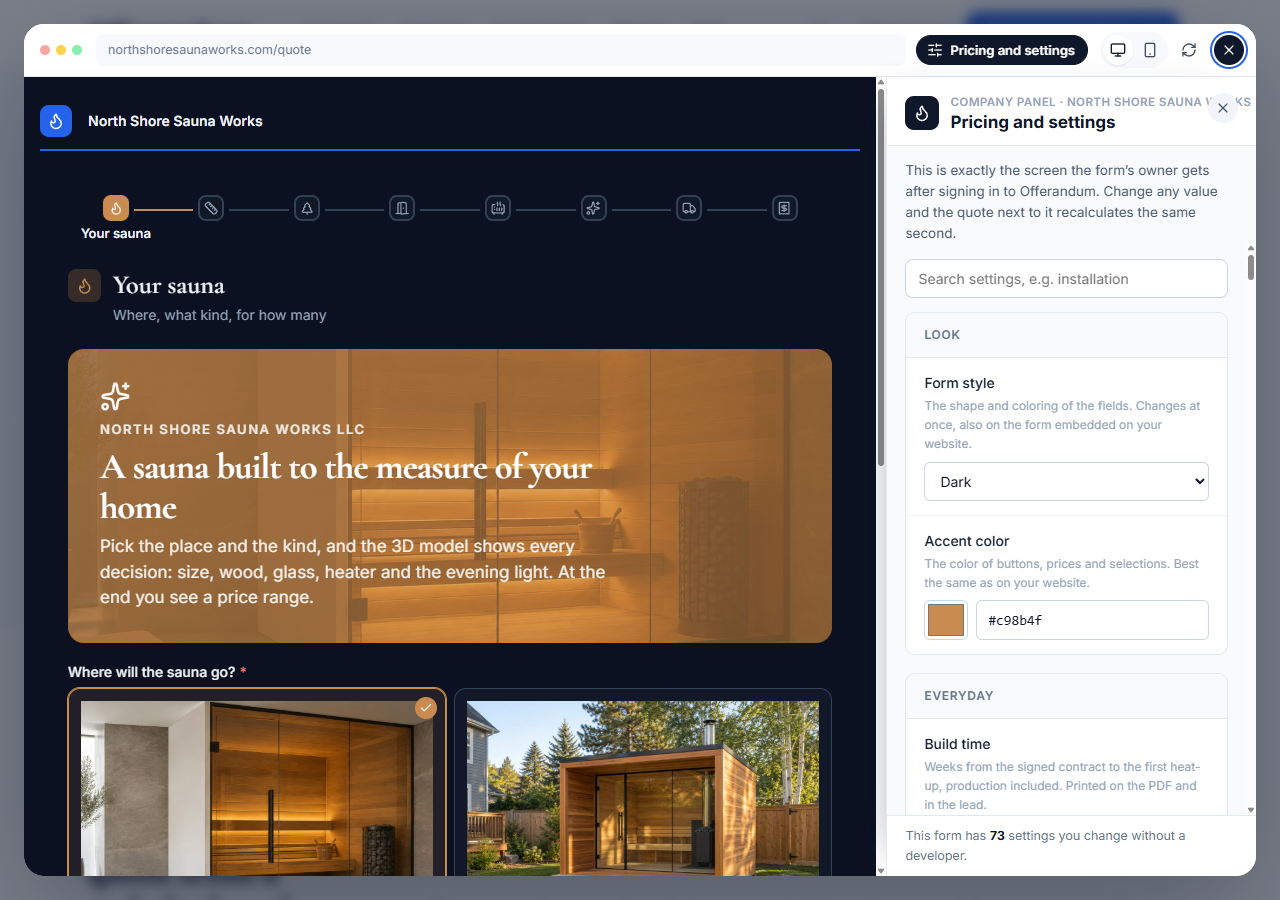
Send the person preparing your calculator a brief that covers these items:
- Offer: the product or service the first calculator will handle, plus anything explicitly outside that scope.
- Inputs: what the customer knows, including dimensions, desired materials, and site information.
- Rules: rates, units, thresholds, minimums, dependencies, and the order in which they apply.
- Output: the meaning of the estimate and what the PDF and incoming request should contain.
- Placement: a hosted link or the exact service page where the calculator belongs.
- Ownership: who approves pricing, updates values, and requests new logic.
Include the standard configuration and exception you used to compare the methods. They should become acceptance examples, not disappear after the purchasing decision. Ask the recipient to identify any missing rule before implementation begins.
In Offerandum, the team prepares the calculator from your pricing materials. You can subsequently edit rate values, thresholds, percentages, and minimums in the panel; new fields or dependencies are logic changes handled separately. Review the implementation and plan scope . Once the calculator is ready, the installation guide covers placement. That order keeps selecting the tool, defining the estimate, and publishing it as three clear tasks.
Describe your products and current estimating process to define the calculator your website needs.
Good to know
Frequently asked questions
Do I need to rebuild my website to add a calculator?
Not necessarily. Offerandum can be embedded where your website allows HTML and JavaScript, or shared through a hosted link. Check the published page and its layout before sending customers to it.
Does embedding the calculator create my pricing rules?
No. Your product options, rates, and rules need to be prepared first. The embed code displays the calculator that has already been built and published.
What should I provide for implementation?
We can start with a conversation about your business, your website and previous estimates. Together, we organize the products, options, pricing rules and exceptions. Sample jobs help us check the calculations; you do not need a complete specification before getting in touch.
Can an estimate still require a site visit?
Yes. Explain which items are included and which conditions need verification. The calculator should make the next step clear rather than suggest that an online selection confirms jobsite conditions.