
Installation guide
Quote calculator for Wix
Add a quote calculator to your Wix website using your own price list. Offerandum prepares the questions, itemized estimate and PDF quote; you maintain the exposed rates in your panel. Start with the screen printing example below, or choose another service calculator.
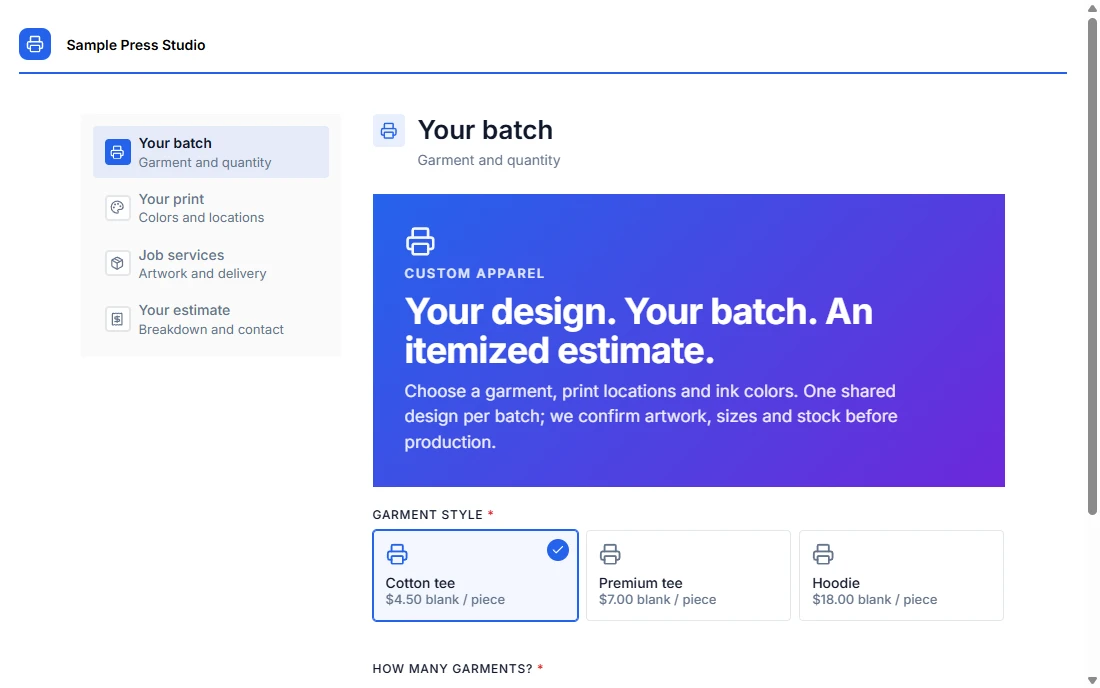 Change the options. See the estimate.
 Get a quote calculator for your Wix site , or check setup and subscription pricing . Your version is prepared for review and testing before launch.
Try a screen printing quote generator
Choose garments, a quantity and ink colors. Add a back print or an underbase, then compare the cost breakdown and average price per garment. This demonstration prices one garment style and shared design per batch using illustrative rates, before applicable tax.
Try it yourself
Screen printing quote calculator
The full screen printing example explains the quantity discounts, screen setup and minimum production charge with worked calculations. For cards, flyers, banners and signs, see the commercial print shop form . Service businesses can start from the house cleaning estimate form .
Prepare the rules before embedding
Send your current price list, options and sample quotes. Identify costs charged per item, per print location or once per job. We prepare a form for your review and adapt the fields to the information your customer can supply.
Your estimator checks the result and PDF before publication. After launch, prices can be maintained in the company panel . The pricing page covers setup and ongoing service. You can also collect specifications without displaying prices, retaining the estimate for your team's review.
Add the form with Embed HTML
- Copy the published form's complete website snippet from Offerandum.
- In Wix Editor, use Add Elements → Embed Code → Embed HTML .
- Paste both the loader and form element into that one embed.
- Set the outer element's width and height, publish, and check the public page.
Use HTTPS resources. Wix's embedding guide explains the HTML embed and its dimensions. Wix Studio controls may differ; check the editor used for your site.
The embed runs in a separate frame. A loader placed only in the surrounding site's Custom Code area cannot reach a form element inside that frame. Keep the snippet together for this installation method.
Make room for the full result on mobile
The form responds to the width available inside its frame. Wix controls the outer frame, so the website layout also needs to leave enough room. Visit every step, especially the result and contact details, when setting the height.
Check desktop and mobile separately: questions may wrap and the summary becomes taller on a narrow screen. Make sure the Next button, PDF download and submit button can all be reached. Test pickup and shipping, short and long job notes, and any option that reveals extra content.
If the frame makes the page awkward, use a button linking to the form's hosted address. This opens the same quoting flow on a full page. It is also an option when the site's current editor or plan does not permit the required embed.
Test the published page before taking requests
Check the allowed website addresses in the Offerandum panel. Use the real public address for verification, rather than relying on the editor preview. If an embed reports a domain error, keep the error and page address for troubleshooting; do not assume the editor preview and published frame use the same origin.
Use the panel's test link or its test-token setting for trial submissions, then remove the test setting before launch. Check the received specification and the PDF quote against the choices made. The installation guide covers the shared steps.
The screen printing example produces an estimate for review. It does not inspect artwork, check garment stock, collect payment or reserve press time. Your team confirms those details before accepting the job.
Get a quote calculator for your Wix site . Send your Wix page address, current rates and a few examples of jobs you quote. For another platform, see the Squarespace quote calculator or our WordPress embed guide .
Good to know
Frequently asked questions
Can I add a screen printing quote generator to Wix?
Yes. The demo prices a garment batch, front and back ink colors, underbases and screen setup. We adapt its rates and rules to your shop, then you embed the form or link to its hosted page.
Do I paste the script into Wix Custom Code?
For the Embed HTML method, paste the complete form snippet inside that element. It runs in a separate frame; a loader in the surrounding Wix page does not initialize an element inside the frame.
Why is the bottom of the form cut off?
The outer Wix embed has its own dimensions. Increase its height to fit the longest step and check the mobile layout separately. A hosted form link avoids the extra frame.
Will the form change my Wix checkout?
No. It prepares an estimate and customer request. This example does not add items to a Wix cart, collect payment, reserve production time or confirm an order.
Who updates the rates?
Your team changes exposed rates and thresholds in the Offerandum panel. New questions and changes to pricing logic are agreed with the team preparing your form.
// live demo
Want a form like this for your business?
I will show you live how it works from the company side: the panel, the leads and the PDF quote. Tell us what you quote and you get a link to pick a time by e-mail.
- Free, no strings attached
- You pick the time in the calendar
- Online meeting in Google Meet

I run the demo myself: you will see how a form like this would work in your business.
Damian Krychowski, founder of Offerandum