
Installation guide
Quote calculator for Squarespace
Add a quote calculator to your Squarespace website using your own price list. Offerandum builds the questions, pricing rules and PDF quote for your business. Customers get an instant estimate and send their requirements; you update everyday rates in the company panel.
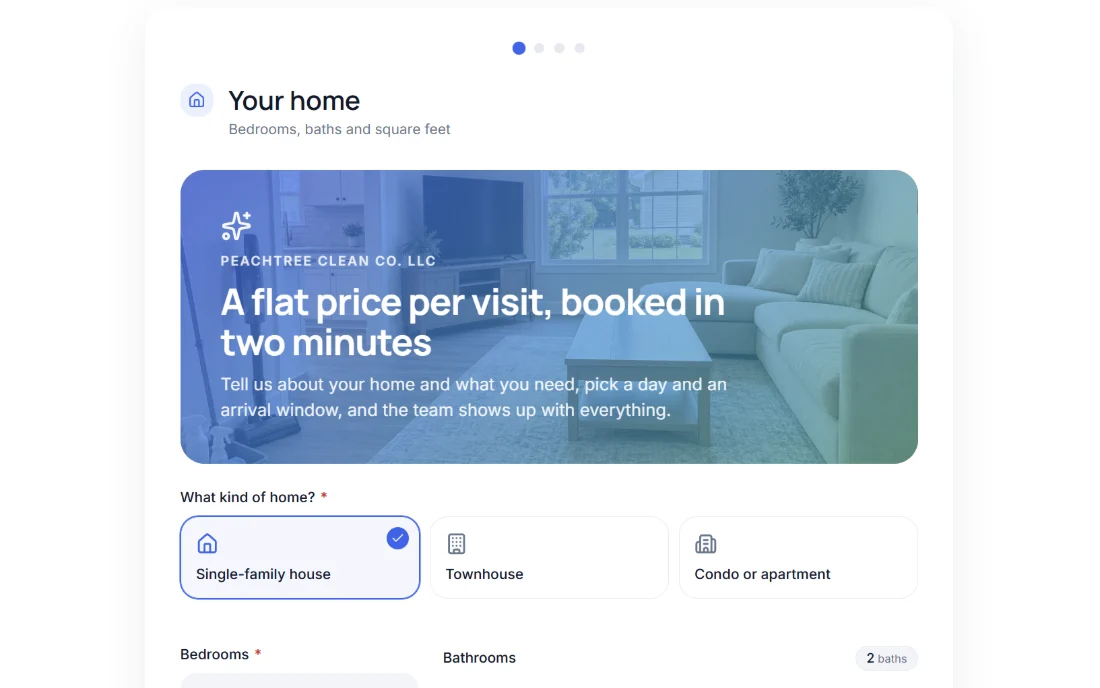 Change the options. See the estimate.
 Get a quote calculator for your Squarespace site , or check setup and subscription pricing . We prepare your version for review and testing before you decide to launch.
Try an instant quote calculator
This cleaning example asks about the home, service frequency and extras, then separates the first visit from recurring costs. Change the answers and inspect the estimate. The demo uses illustrative rates and does not submit a real booking.
Try it yourself
House cleaning quote and booking
For apparel jobs, try the screen printing quote generator : blank garments, front and back colors, screen setup and quantity breaks. For paper products, use the commercial print shop form . Each example can be adapted to your price list; the website platform does not decide your pricing rules.
Choose a calculator for the work you quote
- Cleaning and recurring services: the house cleaning calculator asks about the home, frequency and extras. Your customer can compare the first visit with recurring costs before requesting a booking.
- Screen printing: the screen printing quote calculator separates garment costs, printing, screen setup and quantity discounts. The result includes the order total and average cost per garment.
- Pergolas and patio covers: the pergola cost calculator uses dimensions, roof type, screens and installation to prepare a preliminary range. A 3D preview shows the chosen configuration.
These are working demonstrations with illustrative rates. We adapt the questions and calculation to your business rather than copying the demo's prices into your website.
Your pricing rules, estimate and PDF quote
The calculator can apply minimum charges, quantity breaks, surcharges and discounts in the order agreed with your estimator. Customers can receive an exact amount or a range, while unusual jobs can remain requests for individual review.
The PDF quote preserves the selected scope for follow-up. The price-list panel lets your team maintain exposed rates and thresholds after launch. You do not have to write the formulas yourself: send sample jobs with expected totals so we can check them together.
From your rates to a customer request
Send your price list and a few jobs you have already quoted. Include minimum charges, options, quantity breaks and exceptions. We prepare the form and its PDF, and you check the results before launch. You can show prices or collect the specification for an internal estimate and follow-up.
After launch, update the exposed rates in the price list panel . New questions or different calculation rules are changes to agree with our team. The pricing page explains setup and ongoing service.
If you are still organizing your rates, follow the guide to turning a service price list into a Squarespace quote calculator .
Add the form to Squarespace
- Publish your form in Offerandum and copy its website snippet from the panel.
- Edit the Squarespace page, add a Code block and select HTML.
- Paste the complete snippet with Display Source turned off.
- Save and check the published page outside the editor.
JavaScript embeds require Core, Plus or Advanced, or a legacy Business or Commerce plan. Basic and legacy Personal users can place a button to the form's hosted page instead. See the current Squarespace Code block documentation .
Use a section wide enough for the questions and result. If you use a site-wide loader, place only the loader in the Header field of Code Injection and retain the form element on its page. Confirm the feature is available on your plan and avoid adding the loader twice. Squarespace describes the available fields in its Code Injection guide .
Check navigation, mobile layout and your domain
Some version 7.0 templates use Ajax navigation; version 7.1 does not use that feature. On an affected 7.0 site, test both a direct visit and navigation from another page while logged out. If custom code fails after navigation, test with Ajax disabled where supported. Skye and the Farro blog landing page have exceptions, so use the official Ajax guidance rather than assuming every template has the same switch. A hosted link is an alternative when the embed cannot be made reliable.
Check the allowed website addresses in Offerandum, including the address used for your published test page. On desktop and mobile, go through every step, change a price-affecting choice and open the PDF. Use the panel's test link or its test-token setting for trial submissions; remove the test setting before accepting customer requests. The general installation guide covers the shared steps.
Quotes, booking requests and discounts
A service estimate can include a preferred date or arrival window. It does not by itself reserve staff, synchronize a booking calendar or take a payment. In the cleaning demo your company confirms the visit after reviewing the request.
Similarly, a recurring-service or quantity discount belongs to the form's estimate. It is not a Squarespace checkout promotion. If you need calendar or checkout behavior, describe the required workflow before setup so the implementation scope is clear.
Get a quote calculator for your Squarespace site . Send your website address, price list and a few sample jobs. For other platforms, see the Wix quote calculator or our WordPress embed guide .
Good to know
Frequently asked questions
Which Squarespace plans support the form embed?
JavaScript in Code blocks is supported on Core, Plus and Advanced, and on legacy Business and Commerce plans. On Basic or legacy Personal, use a button linking to your hosted form. Check your current plan before installing.
Do I have to build the pricing formulas myself?
No. Send your rates, options, exceptions and sample quotes. Offerandum prepares the form for your review. Afterwards you update the exposed rates and thresholds in your panel.
Is a booking form the same as a confirmed appointment?
No. The cleaning demo estimates the work and collects an arrival preference. Your team confirms availability. It does not reserve a live calendar slot, take a deposit or synchronize with Acuity.
Can I add discounts to the calculation?
Yes, when they are part of your agreed pricing rules. The cleaning demo includes recurring-service discounts. A form discount does not create a Squarespace Commerce coupon or change checkout prices.
Can I use a screen printing quote generator on Squarespace?
Yes. Our apparel demo prices garments, print colors, locations and screen setup. We adapt the rates and rules to your shop before you embed it. Artwork and production timing still need your review.
What if the form disappears after changing pages?
Test the published site while logged out. Some version 7.0 templates use Ajax navigation, which can interfere with custom code. Where the template allows it, test with Ajax disabled, or use the hosted form link.
// live demo
Want a form like this for your business?
I will show you live how it works from the company side: the panel, the leads and the PDF quote. Tell us what you quote and you get a link to pick a time by e-mail.
- Free, no strings attached
- You pick the time in the calendar
- Online meeting in Google Meet

I run the demo myself: you will see how a form like this would work in your business.
Damian Krychowski, founder of Offerandum