
Installation guide
3D product configurator for your Shopify store
An Offerandum 3D product configurator on Shopify lets shoppers pick sizes, materials, and accessories on a live 3D model, see accurate pricing immediately, and either add the matched set to their Shopify cart or request a branded PDF quote. You embed it using Shopify's native Custom Liquid section - no bloated apps and no commission on orders.
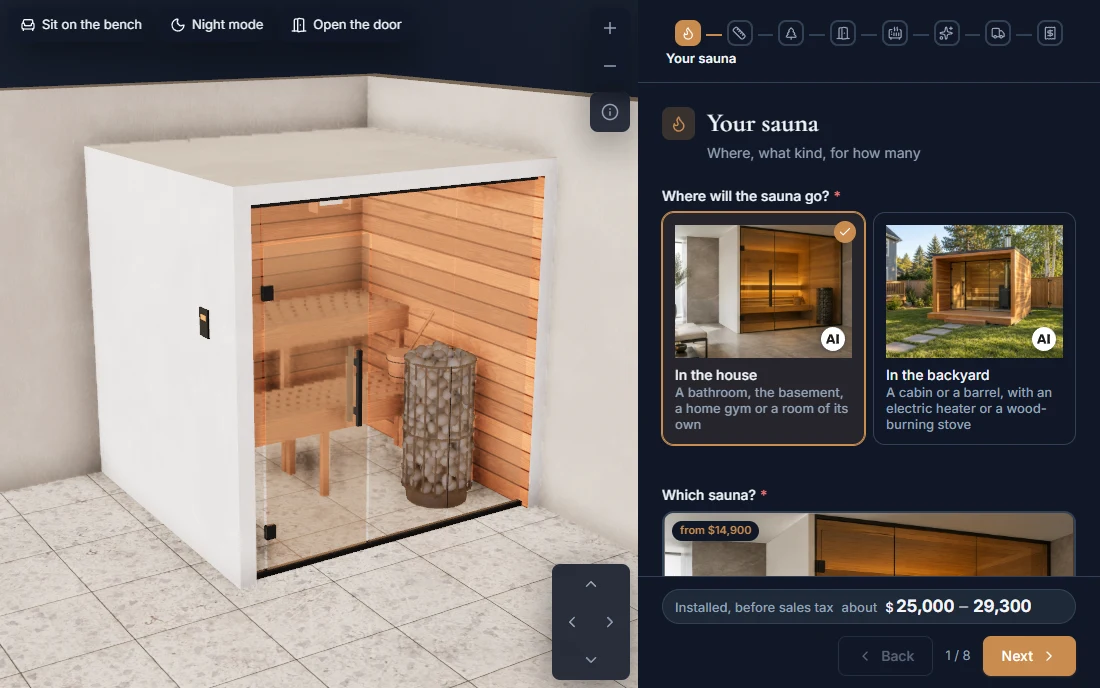 Change the options. See the estimate.
Try a live 3D configurator
Below is a working 3D sauna configurator. On your Shopify store, we build the pricing rules, options, 3D model, and visual style around your own catalog so shoppers configure what you actually sell.
Try it yourself
Backyard saunas
Shopify cart checkout vs. PDF quote requests
Most stores selling custom or high-ticket products (sheds, saunas, hot tubs, pergolas, furniture, enclosures) need one of two flows - or both in the same configurator:
- Direct to Shopify cart - for catalog products and modular add-ons, the configurator hands selected variant IDs and quantities to Shopify via the
offerandum:cartbrowser event and Shopify's standard Ajax Cart API (/cart/add.js). Checkout, taxes, shipping, and payments stay 100% inside Shopify. - Instant quote request + PDF - for custom dimensions, site-specific delivery, or high-ticket builds, the shopper downloads a branded PDF quote with every selected option and visual preview, and your sales team receives the qualified lead.
You can also combine both: standard catalog configurations go to the Shopify cart, while out-of-range dimensions route to a tailored quote request. See online store integration for the complete flow.
Add the configurator to Shopify step by step
- Open Home in your Offerandum panel, select your published configurator, and copy the embed snippet.
- In your Shopify admin, go to Online Store -> Themes -> Customize .
- Open the page or product template where you want the configurator to appear. Many merchants create a dedicated "Build & Quote" page or assign a separate product template to configurable models.
- Click Add section -> Custom Liquid and paste the Offerandum snippet.
- Save and preview the published storefront outside the theme editor on both desktop and mobile.
Optional: place the loader in theme.liquid for attribution
If you want Offerandum's built-in statistics to record which ad campaign or referral brought a buyer to your store before they reached the configurator page, place the widget.js script tag once in theme.liquid just before the closing head tag. Then keep only the offerandum-form element inside your Custom Liquid section.
Connecting to the Shopify cart
When your configurator pushes products to the Shopify cart, add shop="event" to the offerandum-form element and attach a small offerandum:cart event listener that posts the matched variant IDs to /cart/add.js and redirects to /cart . You can view the exact event structure in our general installation guide , and we help wire it up during setup.
Allowed domains and testing before launch
In the Offerandum panel, add both your custom storefront domain and your yourstore.myshopify.com preview domain to the allowed websites list while testing.
Run through a full configuration on desktop and mobile before going live: test option combinations, open the PDF quote or verify the items added to your Shopify cart, and check lead delivery. Every rollout includes 14 days of free testing before you decide to launch - see full terms on our pricing page .
Good to know
Frequently asked questions
Do I need a heavy Shopify App Store plugin to run the configurator?
No. Offerandum embeds cleanly through Shopify's built-in Custom Liquid section. It does not inject bloated scripts across your theme or slow down your product pages.
Can the configurator add selected variants straight to the Shopify cart?
Yes. Using our lightweight event integration (shop='event') and Shopify's Ajax Cart API (/cart/add.js), configured variants and add-ons land directly in your Shopify cart while custom-sized items can end with a quote request and PDF.
Will a 3D configurator slow down my Shopify storefront?
No. The embed script loads asynchronously and runs in an isolated iframe. The 3D scene and its assets load only when a shopper opens the page containing the configurator.
Can I run multiple product configurators on one Shopify store?
Yes. On the Business plan ($299/mo), your subscription includes unlimited configurators and users, so you can embed a dedicated configurator on as many product templates or landing pages as you need.
Can you help install it in our Shopify theme?
Yes. We provide the exact snippet for your theme and can work directly with you or your Shopify developer to wire up the Custom Liquid block and cart handoff.
// live demo
Want a form like this for your business?
I will show you live how it works from the company side: the panel, the leads and the PDF quote. Tell us what you quote and you get a link to pick a time by e-mail.
- Free, no strings attached
- You pick the time in the calendar
- Online meeting in Google Meet

I run the demo myself: you will see how a form like this would work in your business.
Damian Krychowski, founder of Offerandum