
The Offerandum guide
Squarespace quote request form with instant pricing and PDF quotes
A Squarespace quote request form with instant pricing lets a visitor choose a service, review an estimate and send the details your company needs to follow up. With Offerandum, the same selections also become a PDF quote for the customer and your team. The calculator is embedded on your Squarespace page and prepared around your own rates.
Here is the complete flow using a house cleaning business: the home and service choices, the first-visit and recurring prices, the request, and the document your office receives. You can try the calculator and download its sample PDF below. All prices are demonstration rates, not market averages or an offer to clean a home.
Start with the questions that change the price
A message such as “How much to clean my house?” leaves your office asking about rooms, floor area and frequency before it can quote. A calculator collects those details in a consistent order and uses them in the estimate.
The house cleaning example starts with bedrooms, bathrooms, floor area, stories and pets. The customer then chooses recurring cleaning or a one-time service, adds extras and selects whose supplies the crew will use. These choices describe work your estimator can check.
For your own business, include only questions that help price or prepare the job. Explain units beside the fields: this demo asks for finished, heated floor area and excludes the garage. For unusual properties or work outside your standard service, keep a direct contact option available.
Try it yourself
House cleaning quote and booking
Show the first visit and recurring price separately
Use the default home in the demo: three bedrooms, two bathrooms, 1,800 square feet and one story, with no pets or extras. Choose recurring cleaning every two weeks and leave supplies with the cleaning company. At the default rates, the standard clean is calculated as follows:
- Base visit for one bedroom and one bathroom: $119 .
- Two additional bedrooms: $40 .
- One additional bathroom: $25 .
- Two started 500-square-foot increments above 1,000 square feet: $44 .
- Standard price before the plan discount: $228 .
The every-two-weeks discount is 15%, so a regular visit is $228 × 0.85 = $193.80, rounded to $194 . The first visit has a 40% deep-clean surcharge and no plan discount: $228 × 1.40 = $319.20, rounded to $319 . There is no promotion in this example, and both prices exceed the $99 minimum.
That distinction matters when a visitor decides to request the service. Showing only $194 would leave the first visit unexplained. The quote step displays both amounts so the customer can review them before entering their contact details.
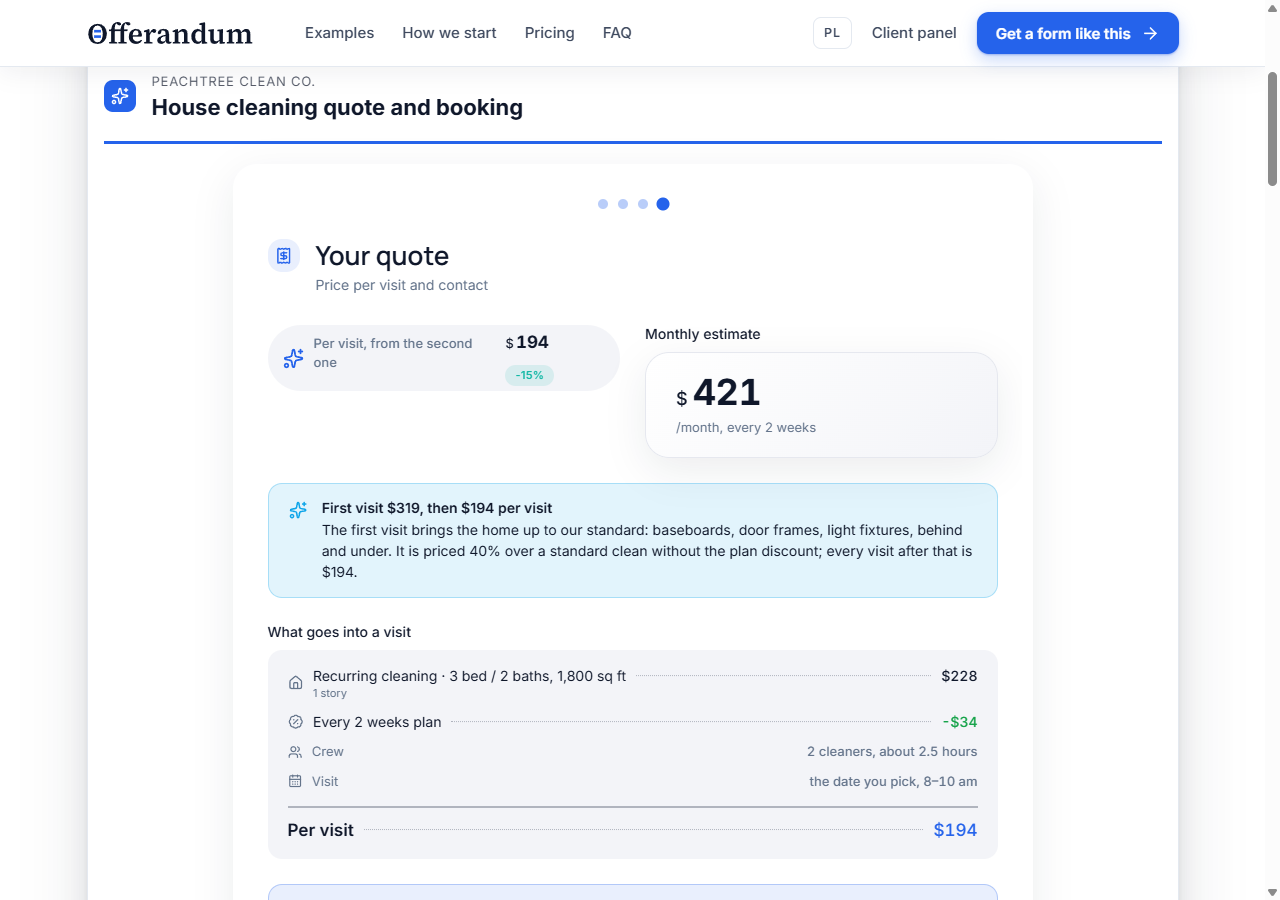
This screenshot comes from the Offerandum demo, not a customer installation on Squarespace. Your version uses the rules and wording you approve. If your first visit costs the same as later visits, the calculator should reflect that policy.
Collect the request with the choices attached
The cleaning form also asks for a preferred date, arrival window, address and access information. The final step collects a name, phone number, email and notes. Your office can then review a defined service request instead of rebuilding the estimate from a short message.
Be clear about the next step. Choosing a date in this example is a request for that date; your team still confirms availability. The demo does not reserve staff, synchronize a calendar or take a deposit. If those actions are needed, include them in the setup discussion.
This implementation uses a separate Offerandum form embedded on the page. The questions, calculations and submission belong to that form. It does not fill an existing Squarespace Form block or change Squarespace Commerce checkout prices.
Keep the estimate in a PDF your office can use
Download the sample cleaning quote PDF generated by this calculator. It uses the same demonstration configuration as the worked estimate and is labeled as a sample.
The document preserves the home description, service frequency, selected extras and price information. It also provides space for visit details and customer notes. Your office can refer to those choices when confirming the job or explaining a revised scope.
In a live Offerandum setup, the customer and company receive the PDF by email when the request is submitted, and the lead is available in the company panel. The public demo is local to the browser: trying it does not send a booking to a cleaning company. See how PDF quotes work for the wider workflow.
Before launch, read the PDF as carefully as the form. Check the first-visit price, recurring price, included work and next steps. Replace demonstration promises about guarantees, supplies and response times with commitments your company actually makes. If a price depends on information you must verify, explain that beside the estimate and in the document.
Place the calculator on your Squarespace service page
Put the form near the description of the service it estimates. A short introduction should tell visitors what information they need and what happens after submission. For this example, a cleaning service page is a natural place to compare visit options and request a quote.
Once your calculator is ready, use the Squarespace quote calculator installation guide to add the supplied snippet and check the published page. Embedding requires a plan that supports the necessary custom code; Squarespace documents this in its Code block guide . You can also link to the calculator's hosted page from a button on your site.
Check the published page on a phone as well as a desktop. Go through the choices, inspect the result and open the PDF. Use Offerandum's test mode when checking a live installation so trial requests are marked as tests.
Prepare your version around jobs you already quote
Send your Squarespace page address, service options and existing pricing materials. Include a typical job, a first visit, an example with extras and any minimum-charge rule. If the rules still need organizing, follow the guide to turning a service price list into a Squarespace quote calculator .
Offerandum prepares the questions, calculation and PDF for your review. Your team checks them against known jobs before launch. Afterwards, you can update the exposed rates and thresholds in the price list panel ; new questions or calculation rules are changes to discuss with us.
Send your Squarespace page and pricing materials to discuss your own quote form. You can review setup and subscription pricing before deciding to launch.
Good to know
Frequently asked questions
Can customers see a price before entering their email?
Yes. In this cleaning demo, the quote step shows the estimate above the contact fields. The customer can review the first-visit and recurring prices before entering their name, phone and email.
Does this add calculations to my existing Squarespace Form block?
This approach embeds a separate Offerandum calculator on your Squarespace page. It handles the questions, calculations, request and PDF together; it does not add formulas to your existing Form block.
Does the cleaning form confirm a booking or take payment?
It collects a preferred date, arrival window and service details. Your company confirms availability and the job. This demo does not reserve a calendar slot or collect payment.
Can I use my own rates and branding in the PDF?
Yes. Offerandum prepares the calculator and PDF around your pricing rules and company details. You review the result before launch and maintain the available rates in your price list panel.
Can I use the calculator if my Squarespace plan does not support the embed?
You can link a button on your site to the calculator's hosted page. Check the Squarespace installation guide for embed requirements before choosing how to publish it.