
The Offerandum guide
Fence estimate calculator for your website: what to include
A fence estimate calculator for your website should turn a homeowner's measurements into a defined scope: fence runs, gates, materials and installation conditions. It gives your estimator a starting point for the site visit. Here is a worked example using a 60-by-120-foot lot, a drive gate and two walk gates, with the resulting PDF available to inspect.
Ask which fence runs the homeowner actually needs
Lot size and new fence footage are different measurements. A house may close part of the boundary. One side may already have a fence that stays. A homeowner replacing only the street-facing section should not have to request an estimate for the entire property.
The fence installation example offers two input methods. Lot dimensions describe a rectangular perimeter: the street side, both sides and the back. Run lengths let the visitor enter the street footage, the two sides combined and the back separately. Use the latter when the planned fence does not follow the full perimeter.
Our demonstration starts with a 60-foot width and a 120-foot depth. That produces 360 feet of perimeter: 60 along the street, 240 along the sides and 60 across the back. Gate openings are still included at this stage.
Write that assumption beside the length fields. Otherwise, one customer may enter the full street side while another subtracts the driveway first. If the calculator deducts a gate from both answers, only one result is correct. A clear label can prevent a measuring convention from becoming a pricing dispute during the follow-up call.
Try it yourself
Fence installation quote
Subtract openings before pricing the fence line
The demo configuration has a 12-foot double drive gate, a 4-foot walk gate beside it and another 4-foot walk gate in the side yard. The openings come off the runs where they belong:
- Street side: 60 − 12 − 4 = 44 feet of fence.
- Sides and back: 240 + 60 − 4 = 296 feet of fence.
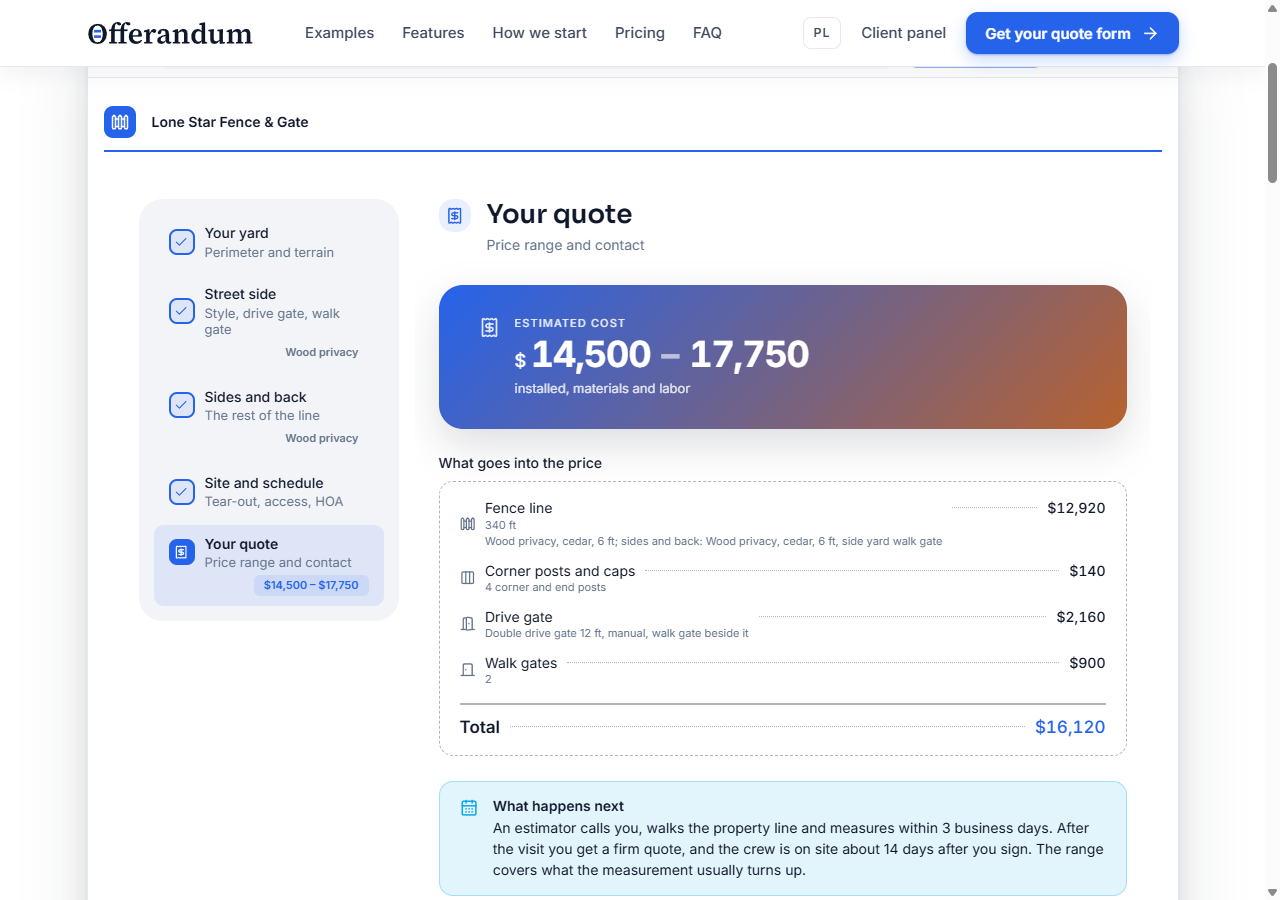
- Net fence line: 44 + 296 = 340 feet, with gates priced separately.
This is why a quote for “360 feet of fence plus three gates” needs a closer look. If the 360 feet includes those openings, charging the full length and then adding the gates would count fence material in places where it will not be installed.
In the cedar privacy configuration, the demo uses 8-foot sections. It rounds the street side up to 6 sections and the remaining footage to 37. The materials list therefore shows 43 sections. That is a planning count based on the example's rules, not a cut schedule.
Before ordering, your crew must lay out individual runs and openings. Two short stretches separated by a gate may need different cuts from one continuous stretch with the same total footage. Post positions, corners and shared supports also need review. Show the preliminary list to explain the estimate, with its assumptions visible.
Define what your price per linear foot includes
Both parts of the sample use 6-foot cedar privacy fencing. The calculator also allows different materials on the street side and along the sides and back. A homeowner could choose an ornamental front while keeping a privacy fence around the yard, without blending those two scopes into one average rate.
For each style, decide what the base rate covers. The US demo's installed pricing includes materials, labor and standard footings. Gates and selected extras have their own rules. If you supply material-only rates during setup, those rates cannot be used as though installation were already included.
Height and finish matter too. In this example, wood species affects the base rate; height adjustments change the per-foot amount. Staining and lattice apply to the relevant selected runs. An opener belongs to the drive gate, rather than to every foot of fence.
Give the implementation team one itemized estimate from your own pricing process. Mark which items are included in the per-foot rate and which are additional. This makes it possible to check the calculation against your business, instead of trying to infer the scope from a total. You can later update exposed rates in the price list panel ; a new pricing relationship is a separate logic change.
Keep terrain, tear-out and travel as separate decisions
A sloped yard, rocky soil and restricted access describe different work. The questions should preserve those distinctions so your estimator can recognize the reason for an adjustment.
In the US demo, slope and rock add percentage adjustments to the fence-line amount. Those adjustments do not multiply the drive-gate opener or the travel charge. The soil answer also includes “Not sure.” That response records uncertainty; it is not proof that standard digging conditions will apply.
Tear-out uses the old fence type, the entered perimeter and an access adjustment when equipment cannot enter the yard. Haul-away is then added separately. This example assumes removal along the whole described perimeter. If your customers often replace only part of an existing fence, your version needs a separate removal length. A general “replacement” checkbox cannot express that difference.
Travel applies beyond the configured service radius and includes the return trip. The demo also has a minimum-job rule, applied before its promotional discount. Check that order against your policy: a discount applied after a minimum can bring the result below that minimum.
HOA notes are collected for the follow-up. The calculator does not check restrictions or approve a design. Your own request wording should explain which details the homeowner supplies and which your team reviews before confirming the work.
Inspect the actual PDF from this configuration
This screenshot shows the estimate produced by the 60-by-120-foot example. The company, rates and scheduling statements belong to the demonstration. They are not market pricing or a quote from a contractor.
Download the sample fence estimate PDF . It was generated from the working calculator using demonstration data, with no customer order involved.
Start with “Your yard.” It records the gross runs and the homeowner's terrain and soil answers. “Fence” preserves the material, height and gate choices. “Materials” lists the section and post counts under the demo's assumptions. In “Estimated cost,” the fence-line item uses 340 feet after the openings are deducted.
The distinction between quantities and price items matters. A materials list can show rails, boards and concrete without charging each again when they are already included in an installed rate. Review the cost breakdown and the materials list together.
The PDF also carries next steps and terms. Replace sample statements about response times and installation timing with commitments your company can meet. The document should explain what the homeowner can expect after submitting, and what remains subject to the site visit. See the PDF quote overview for how these documents fit into the request workflow.
Test changes that reveal a wrong pricing assumption
Use the same baseline configuration and change one choice at a time. Have your estimator check the affected items, not just whether the total moved:
- Widen the drive gate. The street-side fence footage should decrease while the gate calculation changes. The side-yard material rate should stay the same.
- Change only the sides and back. Check that their material, height and extras update without overwriting the street-side selection.
- Select a slope or rocky soil. In this demo, the adjustment belongs to the fence line. Check that unrelated items are not multiplied too.
- Add tear-out, then restrict equipment access. The access adjustment should affect removal. Confirm whether the removal length matches the work you intend to price.
- Choose a short run. Check the minimum-job behavior, then apply any promotion you offer. Agree on whether the final result may fall below the minimum.
Repeat the relevant check after changing rates. Keep a written reference configuration so the next person maintaining the price list can reproduce it. A screenshot of a total alone leaves too many questions about the choices behind it.
Turn the example into your company's calculator
Prepare your fence styles, height ranges, finishes, section assumptions and gate options. Include the rules for terrain, removal, access, travel and small jobs. Flag requests that always need a personal estimate, such as an unusual layout that your standard questions cannot describe reliably.
The Offerandum team builds the calculator from those materials. Your estimator approves the calculations and wording. You then embed the finished calculator on the relevant service page; the WordPress setup guide describes one way to do that. Other sites can use the supplied embed where HTML and JavaScript are supported.
You can show an estimate range or collect the configuration without displaying prices. Either way, the request should preserve the homeowner's selections so the follow-up starts with a defined project. When the site visit changes a dimension or condition, your team can identify the assumption that changed and explain the revised scope.
Share your fence price list and estimating rules to discuss a calculator for your business.
Good to know
Frequently asked questions
Can an online fence estimate replace the site visit?
It records the homeowner's proposed fence line, choices and description of the property. Your estimator still verifies measurements, gate placement, grade, soil and access before confirming the job.
Should gate openings be deducted from fence footage?
Yes, when the entered run length includes those openings. In this demo, a 60-foot street side with a 12-foot drive gate and a 4-foot walk gate leaves 44 feet of fence line. Gates are priced separately.
Can the front and backyard use different fence materials?
Yes. The example has separate street-side and side-and-back choices, including material, height and relevant finishes. The homeowner can also use the same specification throughout.
Is the generated materials list ready for a supplier order?
It is a preliminary list based on the demo's span and assembly assumptions. Confirm each run, post location, opening and cut before ordering. Aggregated footage does not capture every detail of the installation layout.
Can I collect the project details without showing prices?
Yes. A panel setting controls price visibility in this example. With prices hidden, the calculator still records the selections and produces a request summary without the cost section.