
The Offerandum guide
How instant quote calculator setup works: what you get
An instant quote calculator is a website tool built around your pricing rules, and setup takes your rate sheet through implementation, testing and publication. With Offerandum, you receive a hosted link, an embeddable calculator, a pricing panel, leads, PDF quotes and statistics; the first version takes 48 hours counted in business days from your complete price list and order, followed by 14 days of testing.
For a custom sauna builder, that means turning room dimensions, wood choices, glazing and equipment into a process homeowners can follow. You explain how these choices affect the estimate and which conditions need a site visit. As Offerandum's creator, I build the questions and calculations, then you check them against projects you understand. You remain responsible for the business rules and final scope.
The sequence below follows the work from the materials you send to the changes you make after launch. It also separates the calculator your customer sees from the tools your office uses, so you can review the complete handoff before deciding to go live.
Author: Damian .
1. Start with your business and the materials you already have
We often begin with a call: you explain the problem, and I review your website or store, products and options. Previous estimates and your team's experience are useful too. You do not need every rule in a spreadsheet. See an example of how we work together .
If you use a price list, share it in its current format: a spreadsheet, PDF or photo. We can discuss the rules together. A line labeled “installation” needs a unit and a scope: per linear foot, per opening or per job are different instructions.
For a sauna business, describe what the base configuration includes, how additional cubic feet affect the price and which wood, glazing or heater choices add a charge. State which conditions change the calculation and which require a callback. You do not need to write software specifications; explain how you would teach another estimator to prepare the same result.
Your handoff should include:
- the current rates, units, minimums and add-on rules;
- project examples with the estimate you expect;
- company details, logo and website address;
- what the customer should see: an exact price, a range or a follow-up message;
- the service categories included in the initial scope.
I identify missing information before treating the materials as complete. If the work goes beyond the selected plan, I explain that on the first call and quote the extra work before you order. The pricing page describes the plans and their scope.
2. I build the first version in 48 hours
The clock starts with the complete price list and your order, counted in business days. A rate sheet arriving Friday afternoon or during the weekend counts from Monday morning. If a surcharge has no defined basis or a necessary option is missing, I ask you to clarify the rule before implementing it.
AI helps me review the materials and prepare a first draft faster. I personally refine the fields, pricing logic, thresholds, surcharges and dependencies, and we confirm the rules together with your team. I also build the PDF quote and match the logo, colors and font to your website. The result is a working calculator you can review, including the path from customer selections to the written estimate.
In the sauna example, the room's volume and glass area affect heater sizing, while indoor and backyard installations offer different options. Those dependencies need to follow the company's rules as well as the customer's choices. Your setup follows the rules agreed for your business; the demonstration helps you understand the process without requiring you to adopt its pricing method.
You receive access at a test address. That lets your estimator and office staff review the result before a public website change is needed. The first version is the beginning of your review period, so plan to check both the arithmetic and the language customers will read.
3. Use the 14-day test to check actual estimating rules
Choose projects for which you know the expected answer. Include a straightforward job, a job with add-ons, a small job affected by the minimum and a case that needs individual review. Enter each configuration and compare the result with your own worked estimate. A correct total is only part of the check; the included work must also be clear.
Try the custom sauna demo below. Resize the room in feet, choose wood and glazing, then switch to the view from the bench or turn on the evening lighting. The 3D model makes the configuration visible while the calculator applies its pricing and heater-sizing rules. It uses demonstration rates; your own test version needs to match your business's prices and specifications.
Try it yourself
Custom saunas
Review the experience on a phone, then open the PDF. Can a homeowner distinguish an estimate from the next step that requires your team? Do the terms describe the same scope as the calculator? Send corrections with the selected options, the expected result and the rule behind it. That gives me something precise to fix.
Building the calculator and the 14-day test are free. I make corrections during the test, and you decide whether to launch. If you choose not to proceed, there is no charge. Payment happens when you decide to go live after reviewing the working version.
4. Publish through a hosted link or your own website
You can share the calculator at its own address or embed it on a page of your website. The hosted link is useful when you want to send it after a phone inquiry or your website contractor has not yet updated the site. Both options use the same calculator and company settings.
For embedding, the panel provides the code to copy. It contains a script and the element that identifies your calculator and where it should appear. Your website administrator adds the code and lists the website address among the allowed sites in the panel. Add a separate staging address if you use one for testing.
The installation guide explains the process and links to platform instructions. Installation requires a place that accepts the necessary HTML and JavaScript. If your website setup does not allow that, you can keep using the hosted address. I help establish how to add the calculator and check its operation.
Open the published page on desktop and mobile. Use the test link from the panel for a trial submission so the inquiry is marked as a test. The installation instructions also explain testing an embedded calculator with a test token and removing that token when you finish the checks.
5. Receive the lead and the customer's PDF estimate
When a customer submits, your email includes their contact details, selected options and the PDF quote. The customer receives the same document. Your estimator can refer to the chosen configuration during the callback instead of asking the homeowner to reconstruct every selection from memory.
The lead also appears in the company panel's simple CRM. You can change its status, add notes, enter the job value and replay how the customer completed the quote form. Decide who will handle incoming requests and what each status means for your office. The calculator supplies the information; your staff still runs the conversation and confirms the work.
The PDF quote feature describes the document more fully. In the sauna demonstration, the estimate uses Letter paper and includes the sauna configuration, heating details and next steps. The estimate validity period is editable. Review the wording alongside your own sales process so the document makes clear what happens after submission.
Before launch, check the email and PDF with the person who normally prepares estimates. They should be able to understand the project without opening a second worksheet just to identify the options. Where you require site measurements, keep that next step explicit in the information the customer receives.
6. Use your pricing panel and statistics
The price list panel is where you maintain the parameters made available for your calculator. Rates, thresholds, percentages and minimums can be updated without a charge for each edit. You do not have to rewrite the embed code every time a material cost changes.
In the sauna example, editable settings include base prices, the charge per additional cubic foot, wood and equipment upgrades, build time, estimate validity and whether customers see a price range. During handoff, identify the settings your office will use regularly and the person who will maintain them. A panel makes updates accessible, but someone still needs to approve the business change.
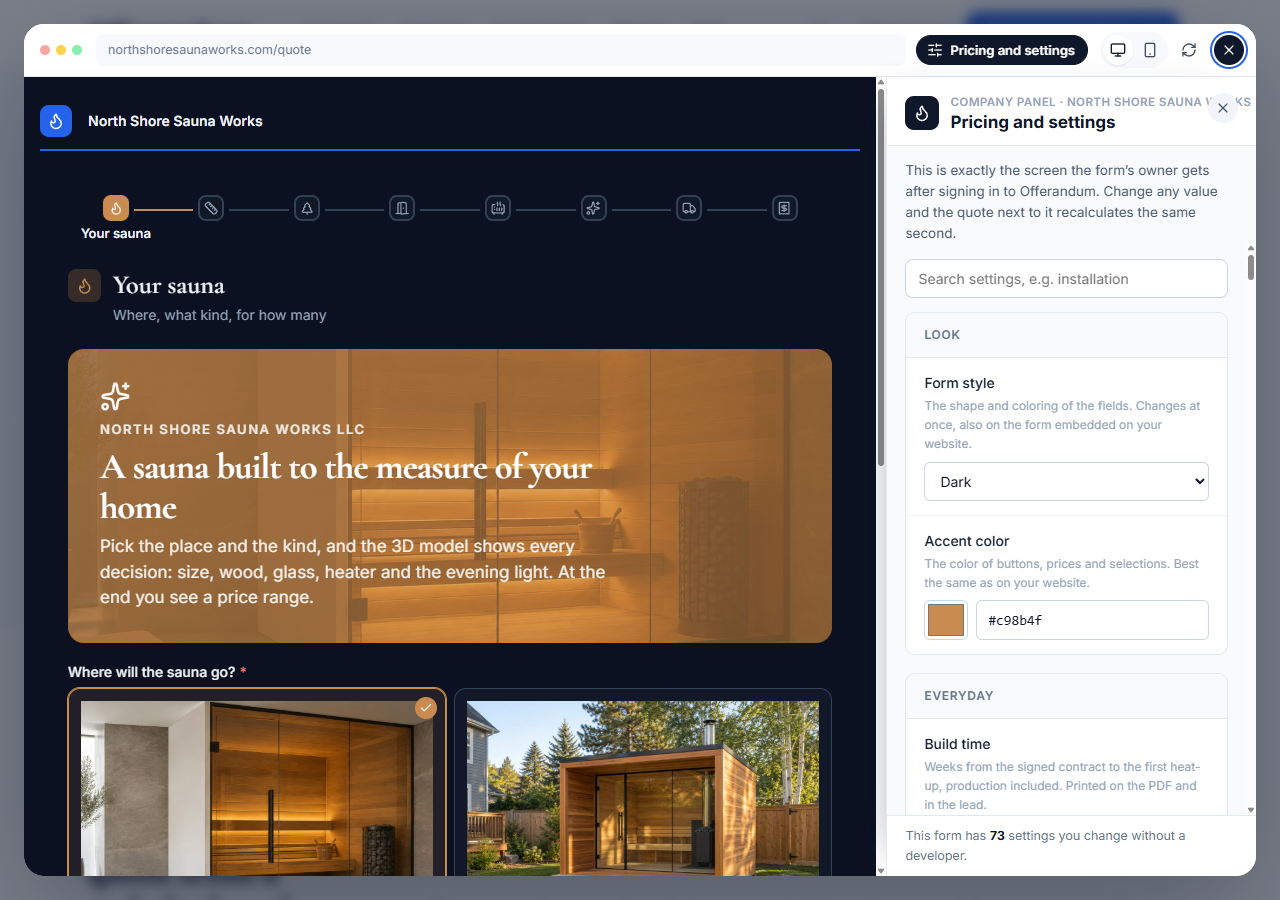
This screenshot shows a sauna demonstration, not a customer installation. Your own settings follow the scope and rules of your calculator. Use the review period to make sure the labels are clear to whoever will maintain prices after launch.
Statistics help you review where customers come from and which inquiries become sales. Keep lead statuses and job values current so that review reflects your office's work. The installation guide explains placing the script in the site header to retain the source when a visitor reaches the calculator through other pages. Treat these tools as information for managing the process, not a promise of a particular sales outcome.
7. Maintain rates yourself and send logic changes to me
After launch, I personally maintain your calculator and handle technical fixes. I also keep developing Offerandum, adding features and improving how customers request estimates and how your office works with the results. You contact me directly for support, including requests to change the calculator to match new estimating rules in your business.
After launch, distinguish a new amount from a new way of calculating. Changing an existing heater upgrade charge is a parameter update. Adding another sauna type, a new question or a dependency between choices is a logic change. You handle the available parameters; I implement the logic changes.
One list of requested logic changes sent in one email is a change package. Your plan determines the included packages and timing. Additional packages are charged when the included ones are used, and a full rebuild is quoted before work begins. Current setup, subscription and change terms are on the pricing page .
At launch, payment covers setup and the first billing period. Annual billing waives the setup fee for the first calculator. Your subscription covers continued use and my ongoing technical support. If you cancel, access continues through the paid period; you can export leads to CSV and download PDF quotes.
Your final handoff should leave you with tested estimates, panel access, a publication method and an assigned person for follow-up. Review those together, because a working calculator is only useful when the office can use what comes out of it.
To walk through setup using your own rate sheet, send me your estimating requirements .
Good to know
Frequently asked questions
What should I send to get started?
We can start with a conversation about your business, your website or store address, and the materials you already use. Together, we identify the products, options, pricing rules and sample jobs needed to check the calculations. You do not need a complete specification or one finished price list.
When does the 48-hour setup period begin?
It starts when I have your complete price list and order, counted in business days. Materials received Friday afternoon or over the weekend count from Monday morning. I tell you what to add if the information is incomplete.
Do I have to pay before trying my calculator?
Building your calculator and the 14-day test at a test address are free. You pay when you decide to launch after testing. If you decide not to launch, there is no charge.
Can I launch without editing my website?
Yes. You can share the calculator's hosted address with customers. When you are ready to embed it, use the code from the panel and add your website address to the allowed sites.
Who handles pricing changes after launch?
You update the available rates, thresholds, percentages and minimums in the panel. I personally handle new fields, product options and pricing dependencies. Those logic changes use the change packages in your plan.